How to edit an objective on Popwork?
Where and how to edit an open objective on Popwork?
Written By Johann Molinari
Last updated 13 days ago
Once you have defined objectives in Popwork, you can modify them at any time
To access all the objectives of your team members/teams, go to the Objectives module in the left pannel.
To access the objectives of a specific team member, go to your shared workspace with the team member and click on Objectives at the top center of the screen.
To edit an objective, click on See details > Edit > Save changes
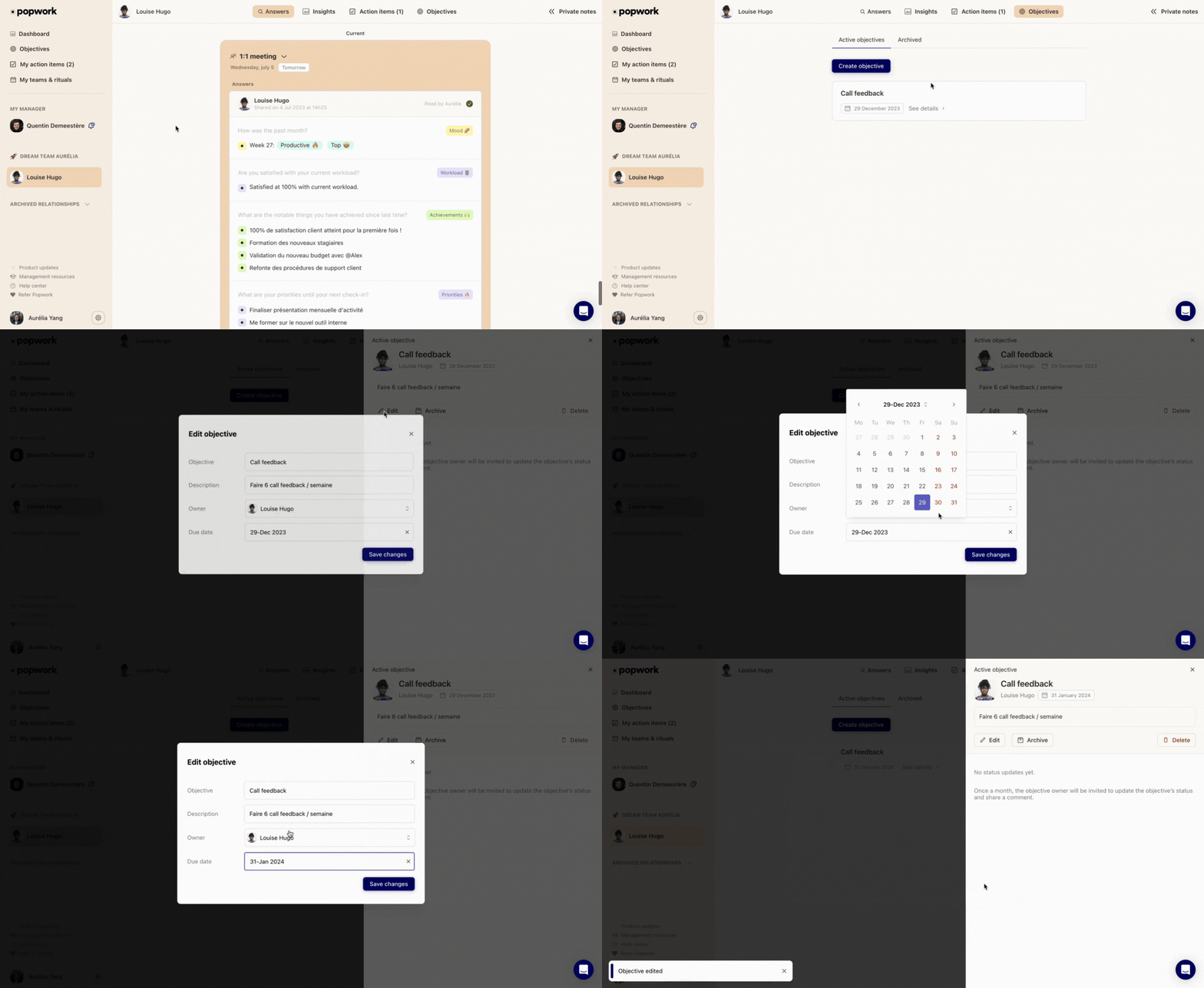
Make your changes and then click "Save Changes" to confirm the objective update.
(Tip: don't forget to update the objective’s due date if necessary to validate the modifications)
Once an objective is set, what happens?
Once your objectives have been defined in Popwork, team members will be invited once a month to update their objectives statuses. The objectives update happens on the last week of each month.
The team member will have to choose a status for each objective (achieved, on track, late or at risk) and add a short comment.
The manager will find the monthly objectives update find this monthly update of objectives directly in the team member’s check-in answers.
Objectives updates and monthly evolution can be consulted at any time in the Objectives view as well.
Was this helpful?
Still need help? Ask the team